







Sign up today and see the results for yourself!
Want to speed up your verification process?
Share a screenshot of your ad revenue from the past 3 months.

Cloudflare helps protect your website from bots and attacks. But publishers also need to think about the traffic reaching their ads. Here is where Traffic Cop fits in, what Cloudflare Free covers, and why you might use both.
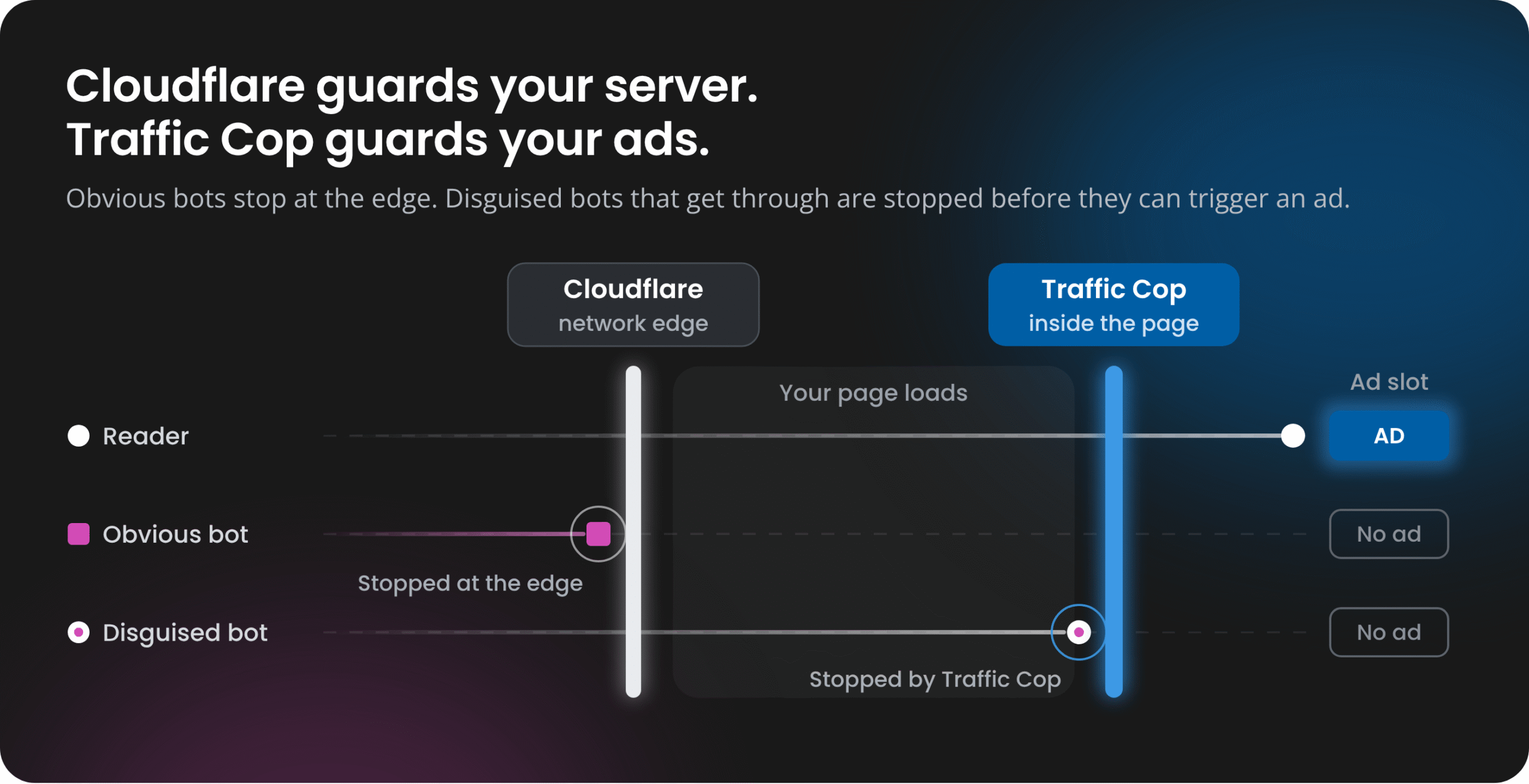
“We already use Cloudflare. Why do we need Traffic Cop?”
If you are already using Cloudflare, adding another traffic-protection tool might sound unnecessary. Cloudflare’s free plan is useful: it includes DDoS protection, a global CDN and Bot Fight Mode, which challenges traffic that looks like a known bot.
The catch is that protecting your website is not quite the same as protecting your ad revenue. Cloudflare checks requests to your site. Traffic Cop checks whether a visit should generate ad requests. For publishers, that matters because Google deducts earnings for invalid traffic (IVT), which can reduce the amount you are paid.
Let us look at what Cloudflare Free covers, how Traffic Cop works differently, and when it makes sense to use them together.
What to know
|
Cloudflare Free is a useful starting point, especially for publishers without a dedicated security team. Bot Fight Mode is easy to enable: turn it on and Cloudflare challenges traffic that matches known bot patterns. There are a few limits worth knowing.
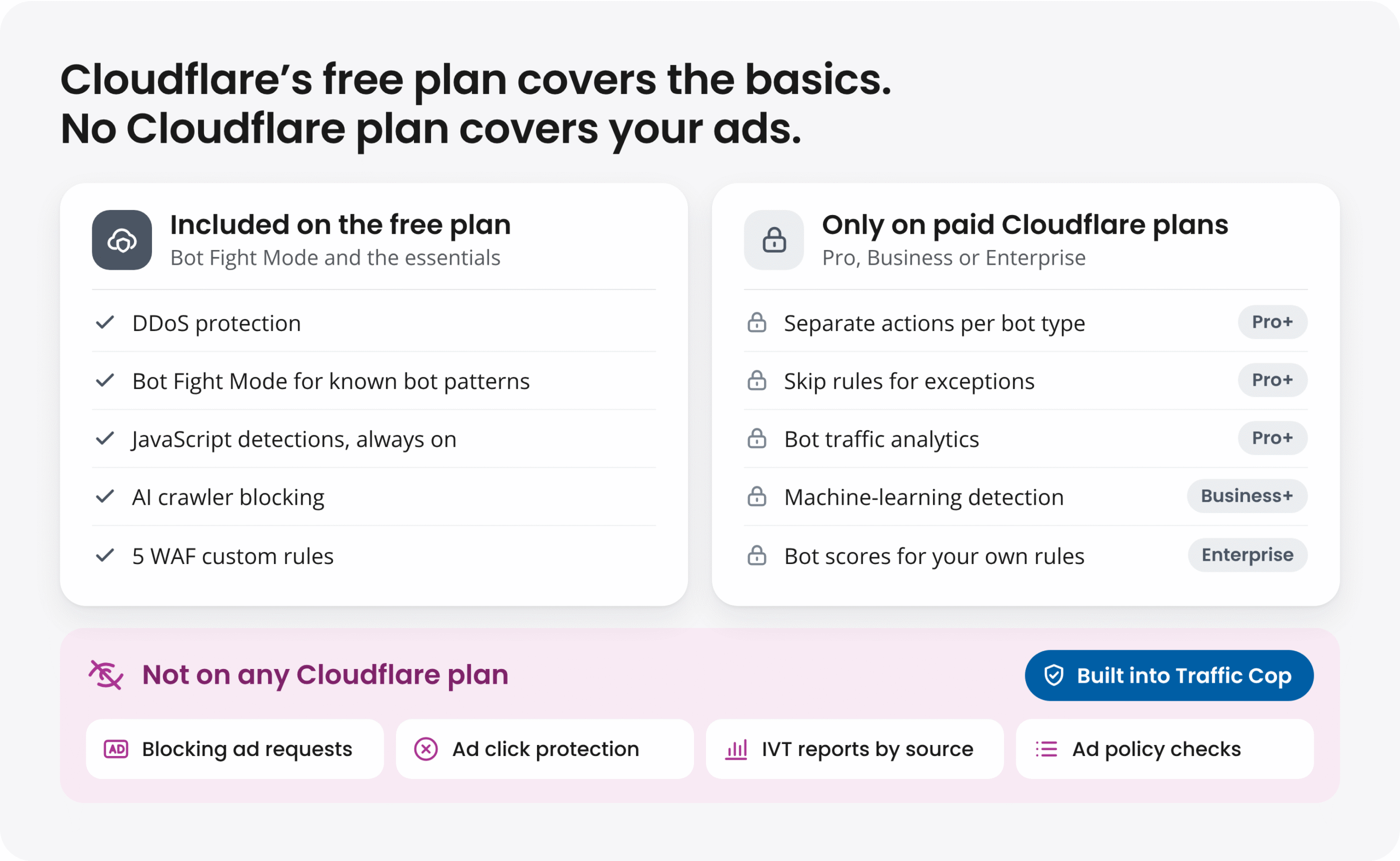
For publishers, the bigger concern is often traffic that appears normal. Known-bot filters help with general invalid traffic (GIVT), including declared crawlers and familiar data-center bots. Sophisticated invalid traffic (SIVT) is harder to catch: it may use automated browsers, residential proxies or devices that behave like regular readers while still loading ads. Thales reported that bad bots made up 40% of web traffic in 2025 and that 41% of bot attacks used Chrome to imitate genuine visitors.
Traffic Cop is designed to catch that harder-to-spot traffic, including sophisticated IVT that gets past Cloudflare’s free plan. Across more than 1,000 sites and 5 billion pageviews a year, publishers using Traffic Cop cut clawbacks from 7.86% to 1.01% in a two-year study.
Bot Fight Mode is built to stop attacks quickly, and that speed comes with a trade-off. Cloudflare’s documentation acknowledges false positives, where “legitimate human or automated traffic is incorrectly challenged or blocked.” On the free plan, you cannot fine-tune Bot Fight Mode or switch it off for specific pages. Cloudflare even describes its Free plan as being “for personal or hobby projects that aren’t business-critical.”
When Bot Fight Mode gets good traffic wrong, the cost lands on your business:
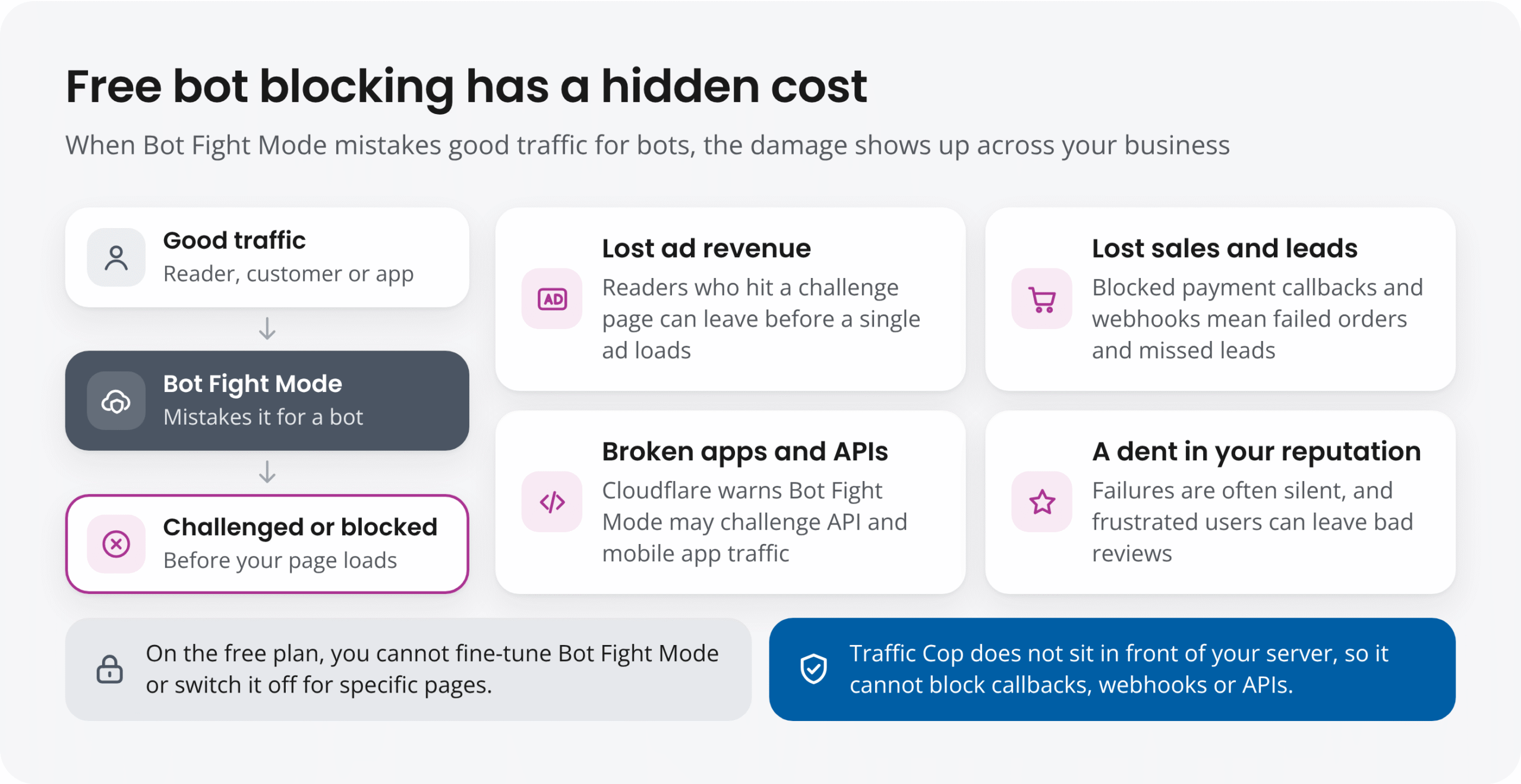
None of this shows up on your Cloudflare bill, which is why “free” can turn out to be the expensive option. If challenges turn away even a small share of real readers or block a handful of orders, the lost revenue can quickly outweigh the cost of a paid tool.
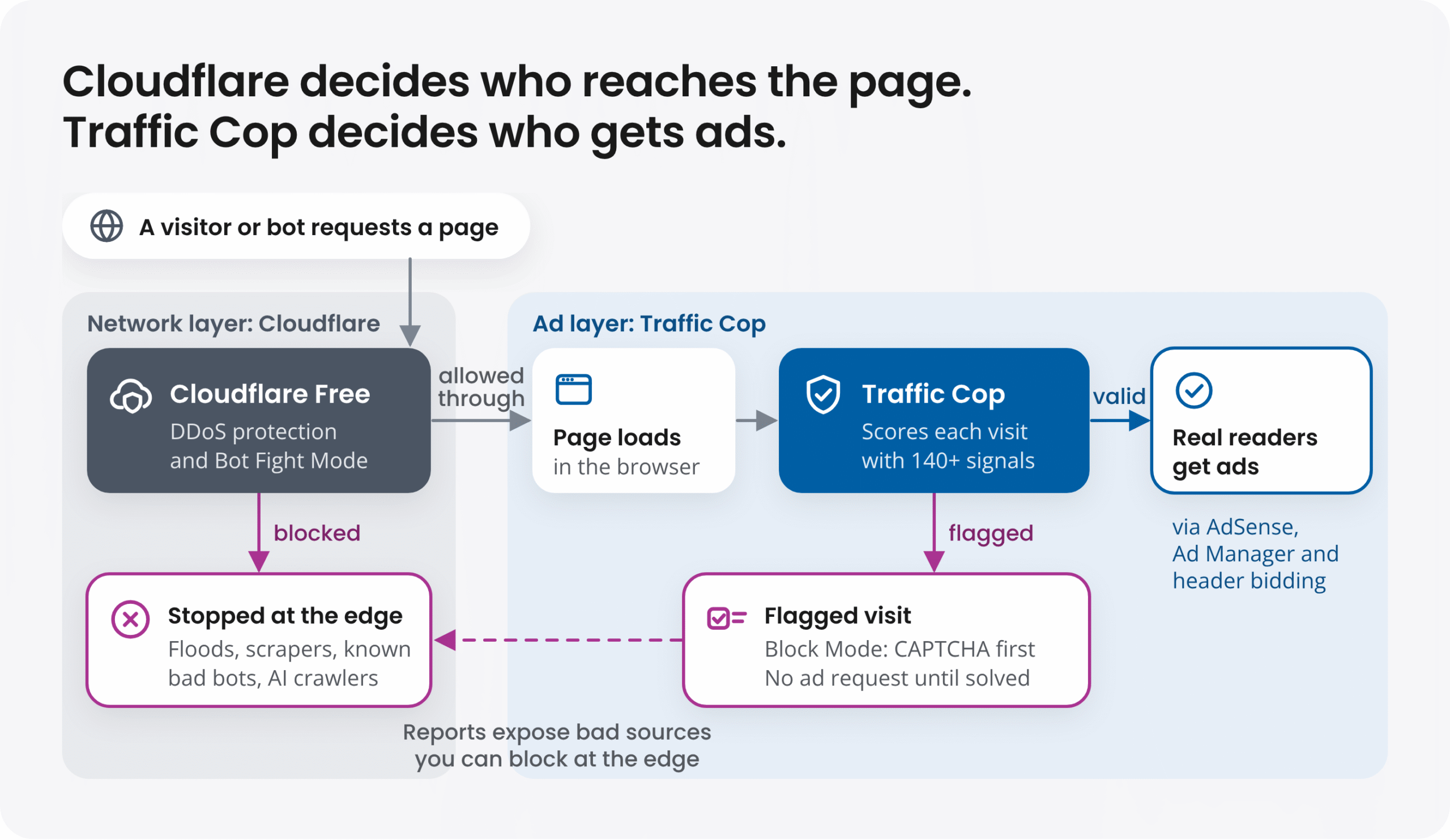
Traffic Cop works differently. It does not sit between visitors and your server, so it cannot block payment callbacks, webhooks or API calls. On your pages, Measure Mode shows what Traffic Cop would flag before anything changes for visitors. In Block Mode, only the visits it flags are asked to solve a CAPTCHA, and ads wait until they do.
Upgrading Cloudflare gives you more control, reporting and detection options. Those features can improve website security, but they do not make Cloudflare an ad-fraud tool. The main difference comes down to the traffic each product can inspect.
Cloudflare sits in front of your website as a reverse proxy. When someone requests a page on a hostname you have proxied through Cloudflare, its network handles that request first. It can allow, challenge or block it based on signals such as network fingerprints and known bot patterns.
Traffic Cop works inside the page, closer to the ads. Its JavaScript tag evaluates visits as ads load, and an SDK and API cover apps and other environments. Using machine learning and more than 140 IVT signals, including on-page behavior and ad interactions, it looks for suspicious activity such as click farms, automated browsers, residential proxies, emulated devices and data-center traffic. It can then prevent flagged visits from requesting ads.
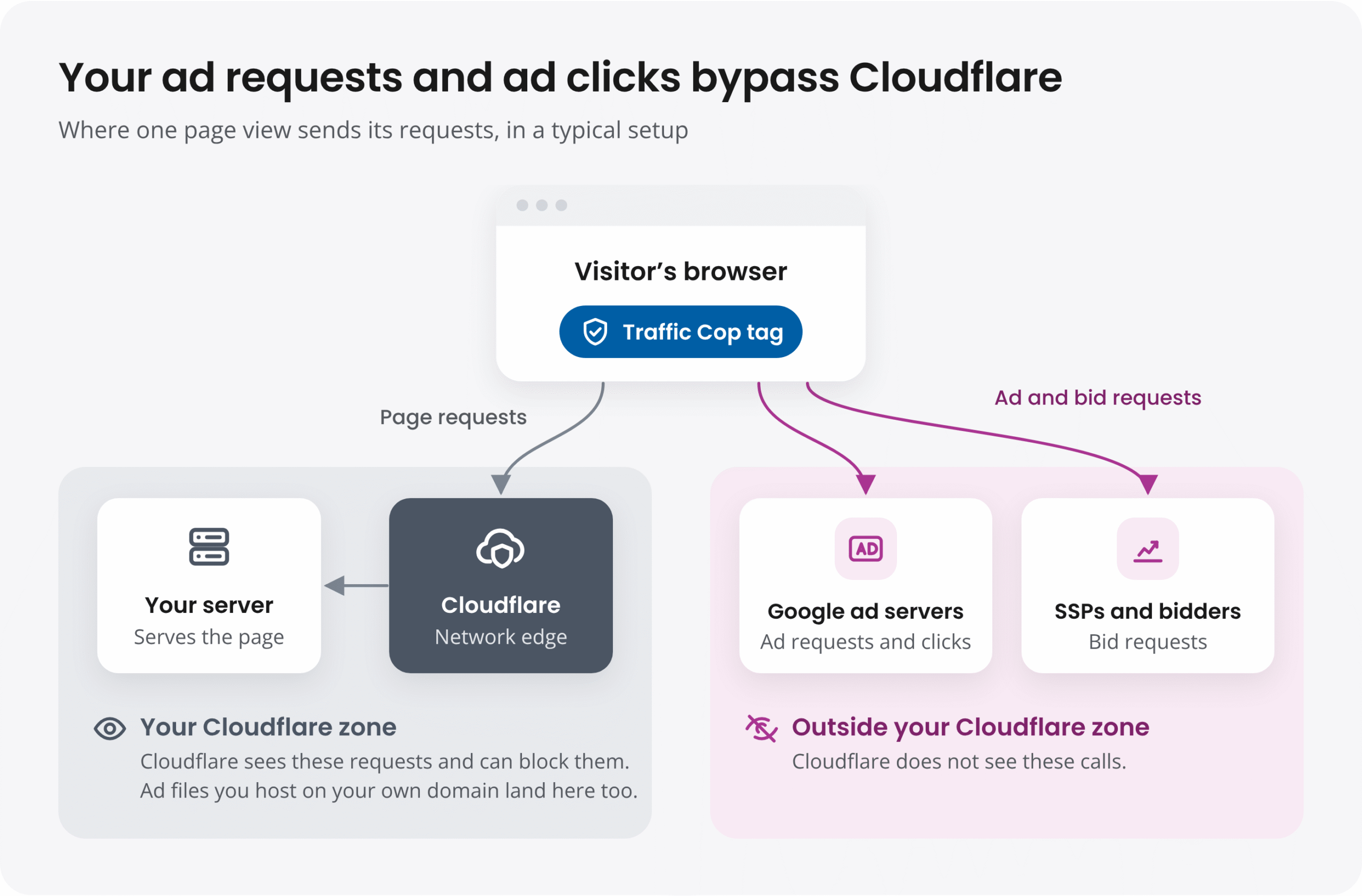
That placement makes a practical difference. In a typical client-side ad setup, the browser sends ad requests to Google and other demand partners, while clicks are handled by the ad network. Those calls generally do not pass through the Cloudflare proxy serving your site. Cloudflare may see a page request without knowing whether that page generated any ad impressions.
This also explains why blocking bots is not enough on its own. Google’s definition of invalid traffic includes accidental and repeated ad clicks, even when a person makes them. Someone can pass a bot check and still generate activity that leads to a deduction. Traffic Cop is designed to assess that ad-related risk.
| Cloudflare Free | Traffic Cop | |
|---|---|---|
| Built to protect | Your website and servers | Your ad revenue and ad accounts |
| Where it runs | At the network edge, as a reverse proxy | Inside the page, where your ads load |
| Question it answers | Should this request reach my server? | Is this visit safe to monetize? |
| Detection | Known bot patterns, plus JavaScript detections | 140+ IVT signals and machine learning, optimized on Google’s deduction feedback |
| Sees ad requests and clicks | No | Yes |
| Action on invalid traffic | Challenges or blocks requests to your site | Blocks the ad request and isolates invalid clicks |
| Risk to good traffic | Can challenge real visitors, apps and payment callbacks; no fine-tuning | Cannot block callbacks or APIs; preview in Measure Mode first |
| Ad policy compliance | Not covered | Ad Policy Grader: 79 Google ad policy checks |
| Reporting | Security events | IVT by traffic source, geo, device and UTM |
| Control | On or off for the whole domain | Measure Mode or Block Mode |
| Setup and cost | Free; point your DNS to Cloudflare | Paid; add our tag, no DNS changes |
Traffic Cop is built specifically for publishers who earn money from ads. That focus shows up in five parts of the product.
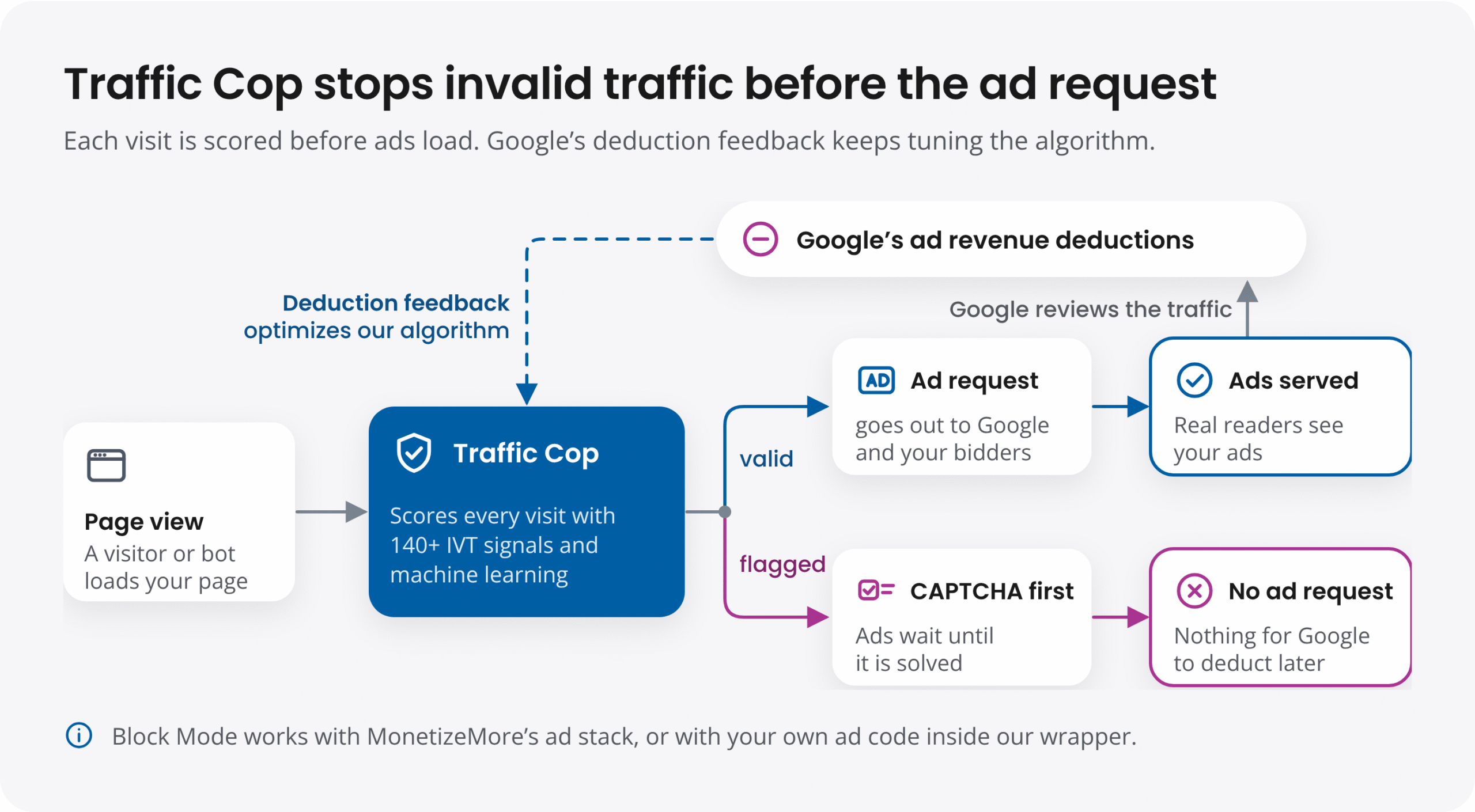
Cloudflare can block a request before it reaches your website. Traffic Cop acts after the page loads but before an ad request is sent. In Block Mode, visitors flagged as suspicious see a CAPTCHA before ads load. If they complete it, ads can appear normally. If they do not, no ad request is sent from that visit, reducing the risk of an invalid impression or click.
The timing matters. Google’s invalid-traffic deductions typically relate to traffic from the past 60 to 90 days, so publishers may find out about a problem well after the traffic occurred (Google). Preventing suspicious ad requests in the first place can help reduce those later adjustments.
Cloudflare’s machine-learning tools are designed to identify automated traffic across its network. Traffic Cop is trained toward a different outcome: it uses monthly feedback from Google’s ad revenue deductions to improve detection. That helps it focus on traffic likely to create monetization problems, not only visits that look automated.
Invalid traffic is not the only thing that can put an ad account at risk. Hidden ad units, ad stacking and improper ad rendering can also lead to policy issues. Traffic Cop’s Ad Policy Grader checks a site against 79 Google ad policy criteria and highlights issues to fix. Website security products such as Cloudflare do not review how your ads are placed.
Bot detection alone does not address accidental clicks, click spam or other suspicious interactions with ads. Traffic Cop is designed to identify and isolate several types of invalid click activity, including abusive and bounce clicks, and to block click-farm traffic.
Example of Traffic Cop’s Ad Click Spam report, shown with sample data. Tabs break the same numbers down by domain, ad unit, country, device, URL and UTM.
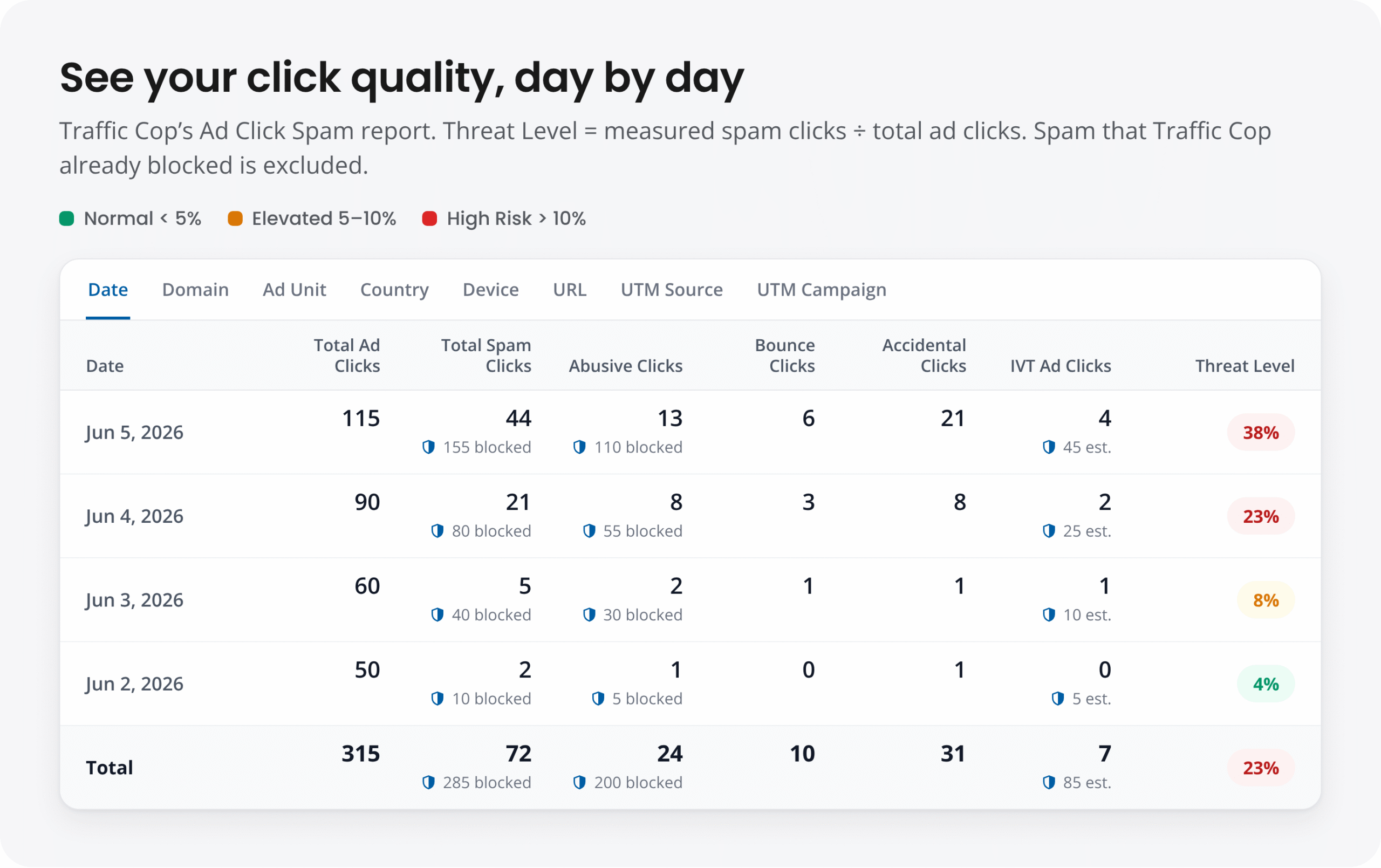
Cloudflare reports security events. Traffic Cop breaks down IVT by traffic source, geography, device and UTM parameters, and highlights campaigns or referrers that may be sending risky visitors. That makes it easier to investigate a traffic source before spending more on it or adding a block rule.
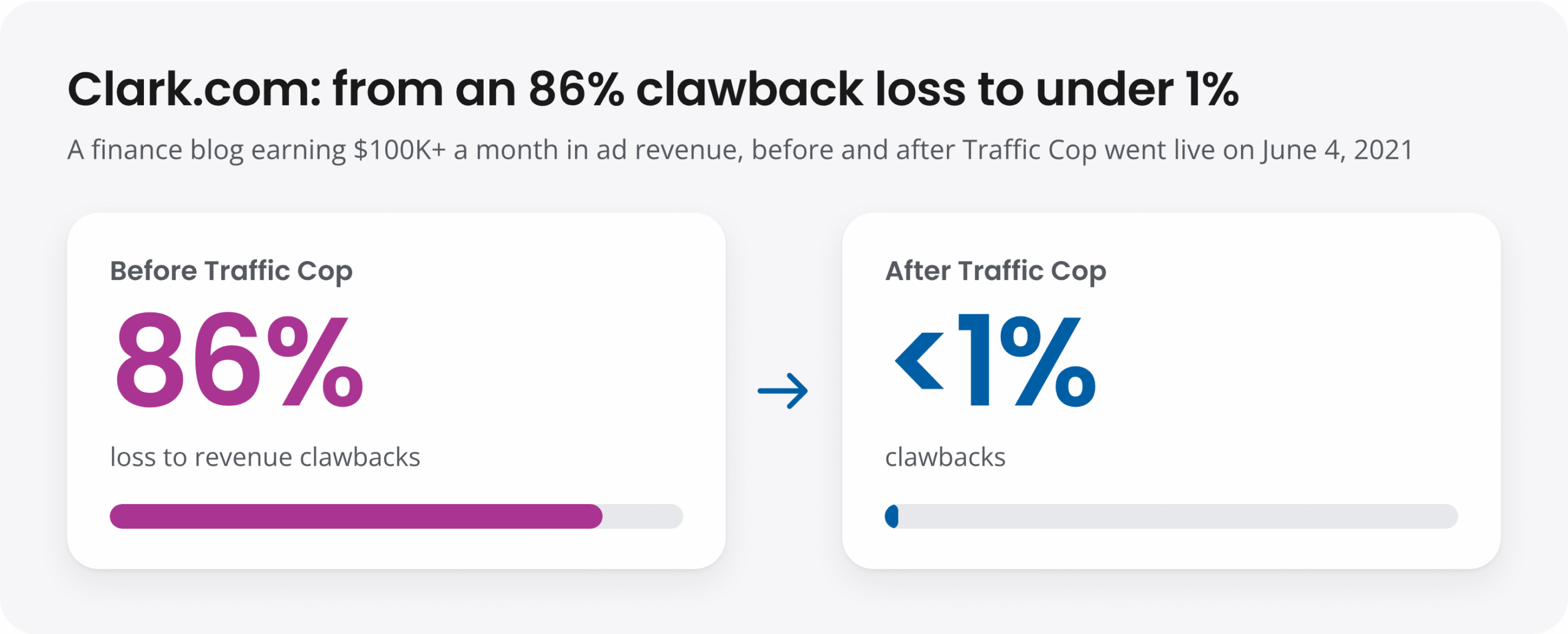
In MonetizeMore’s Clark.com case study, the finance publisher was earning more than $100,000 a month from advertising but was losing a large share of that revenue to clawbacks. After Traffic Cop went live on June 4, 2021, the reported clawback rate fell from 86% to less than 1%.
Traffic Cop was not built in isolation. Since we launched it in 2019, we have worked closely with Google: presenting Traffic Cop, sharing our data, taking their feedback and speaking with their trust and safety team. Every month, we benchmark and refine Traffic Cop’s algorithm against Google’s clawback data, and few companies, if any, see more human and bot traffic than Google.
That work has earned Traffic Cop two Google innovation awards: the Google Publisher Innovation Award in 2020 and the Innovation Award at Google’s Certified Publishing Partner Summit in 2022. That made MonetizeMore the first ad tech company to win a Google innovation award twice.
You do not need to replace Cloudflare to use Traffic Cop. For many publishers, it makes sense to keep Cloudflare in place for website security and add Traffic Cop to assess the visits that reach the ad layer.
Paid Cloudflare tiers offer more flexible bot rules, analytics and machine-learning tools. Enterprise Bot Management adds bot scores, while Precursor adds session-level browser signals. Those features can be valuable for sites dealing with sophisticated attacks. Bot Management is an Enterprise feature, and Cloudflare’s top tier is custom-priced on an annual contract. But they still focus on traffic reaching your website, rather than ad requests sent to Google or other ad platforms. They also do not check your ad placements against Google’s policies. Traffic Cop addresses a different part of the problem.
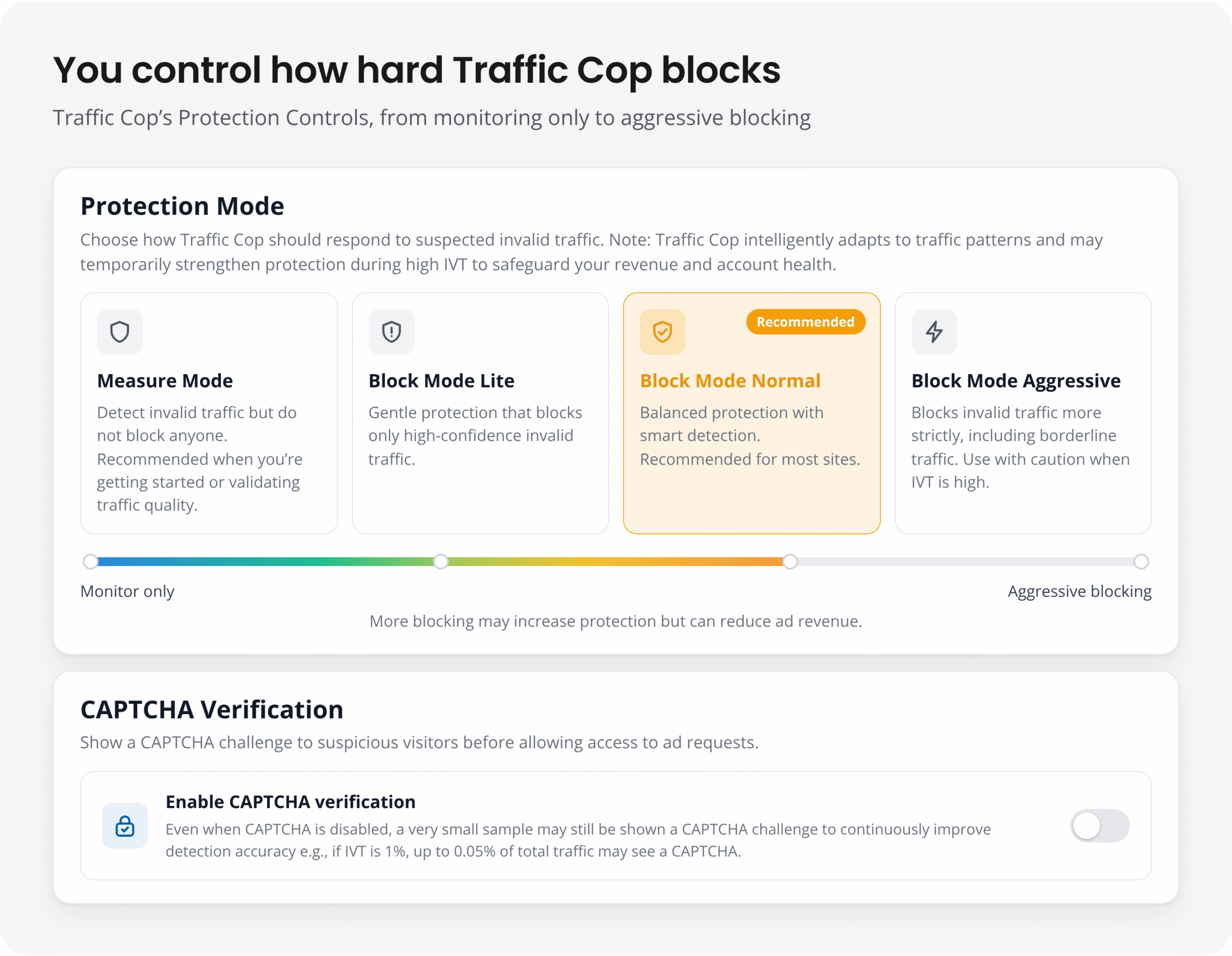
You stay in control the whole way. In Traffic Cop’s Protection Controls, you choose how strictly it blocks, from Measure Mode through Block Mode Lite, Normal and Aggressive, and whether suspicious visitors are asked to solve a CAPTCHA.
It is worth looking more closely at invalid traffic if:
Google’s invalid-traffic policies apply regardless of where visitors came from. AdSense can disable an account for invalid traffic, and Google notes that third parties may generate it without a publisher’s knowledge.
Cloudflare Free is a useful first layer of website protection, and there is good reason to keep using it. But website security and ad-fraud prevention are not quite the same job. If you are seeing deductions, ad-serving limits or questionable results from paid traffic, it helps to measure what is reaching your ads.
Traffic Cop’s Measure Mode is one way to do that before deciding whether to block suspicious visits.
| Get started with Traffic Cop |
It helps by challenging known bot traffic before it can load your pages. But Bot Fight Mode does not inspect ad requests or clicks, and the free plan offers limited controls. It should not be treated as a complete solution for invalid ad traffic.
It can. Cloudflare acknowledges that Bot Fight Mode can mistakenly challenge or block legitimate people and services, and the free plan does not let you fine-tune it or exclude specific pages. If you use it, review Security Events regularly.
Measure Mode only reports on traffic, so it does not add challenges for visitors. In Block Mode, a visit flagged as suspicious is shown a CAPTCHA before ads load. People who complete it can continue to see ads. Traffic Cop Premium also pauses Block Mode once IVT remains below 3% for two consecutive hours.
You do not need to change your DNS. If you use MonetizeMore’s ad stack, Block Mode works with it directly. If you run your own AdSense, AdX or Ad Manager code, you will need to place it in MonetizeMore’s wrapper above the Traffic Cop library. Google Tag Manager is not supported.

Syed Tanveer Jishan is a seasoned Machine Learning Specialist, specializing in anomaly detection with a decade of experience in academia and industry, notably in advertisement technology. He successfully led the development of Traffic Cop, a groundbreaking fraud detection tool for MonetizeMore, yielding a tenfold decrease in ad revenue clawback. As an academic researcher, Syed has published multiple novel research works, merging practical and academic expertise in the machine learning field. His skills and experiences uniquely equip him to help companies safeguard revenues from fraud and improve operational efficiencies using artificial intelligence.

10X your ad revenue with our award-winning solutions.