





Sign up today and see the results for yourself!
Want to speed up your verification process?
Share a screenshot of your ad revenue from the past 3 months.
Google Ad Exchange (AdX) was not detected in your Google Ad Manager (GAM) account. AdX is the premium version of AdSense and the top performing ad network in the world. Your ad revenues are suffering by not integrating AdX into your GAM account.
Step 1: Open your Ad Manager account
Step 2: Go to Admin > Global Settings
Step 3: Check to make sure Ad Exchange is linked

Step 4: Run a Query to find out if there are Ad Exchange line items targeting all of your active ad units.
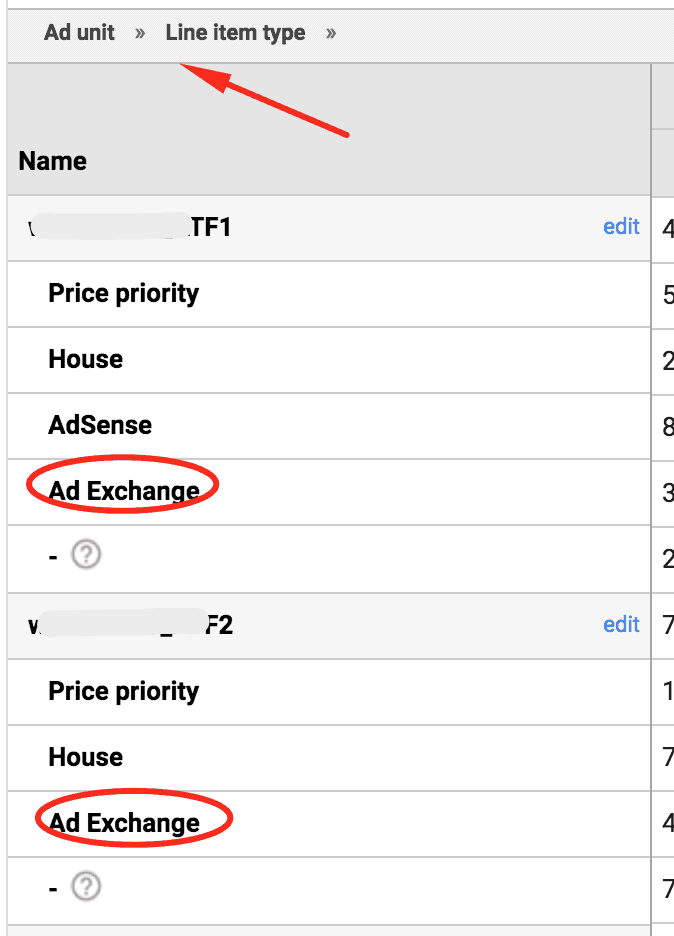
Step 5: Check your Ad Exchange line item settings. Pay attention to the targeting criteria.
Step 6: Check your Ad Exchange pricing rules. Too high CPM floors could result in a lot of advertisers ineligible to bid on your traffic.
Need more help? Sign up for a Premium account today and leverage your long-term RPMs!
If you have an account with us already, send us an email at support@monetizemore.com or log in to PubGuru App and use the Chat widget for immediate support.
Let our AdOps Experts do the hard work. Sign up today and unlock your revenue potential.