





Sign up today and see the results for yourself!
Want to speed up your verification process?
Share a screenshot of your ad revenue from the past 3 months.
You are possibly running an old version of PubGuru Header Bidding.
Step 1: Log into tools.monetizemore.com > MonetizeMore Header Bidding> Configurations
Step 2: Open the PubGuru Header Bidding feature and find the relevant configuration
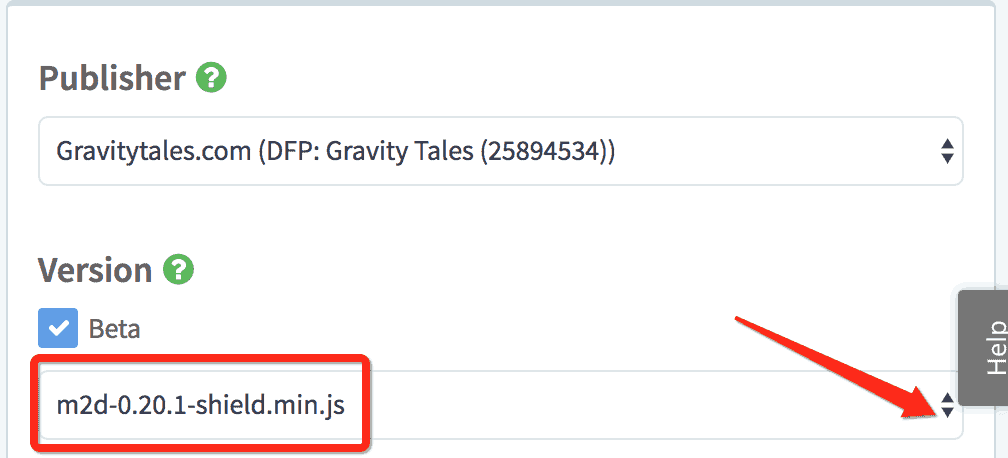
Step 3: Uncheck the “Beta” box, and publish. This will run the most stable version.
Step 4: If for any reason you have to keep “Beta” checked, upgrade the configuration version to a newer one.
Check https://dash.pubguru.com/pghb-versions for information on the different PubGuru Header Bidding versions.
Step 5: Save and publish
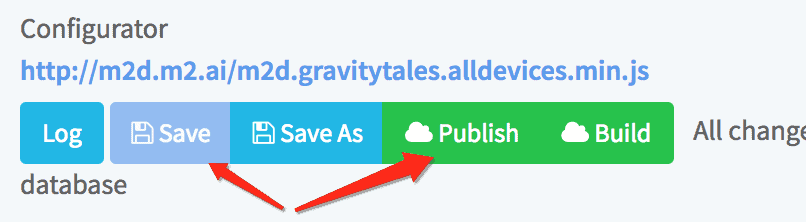
Step 6: Re-run a debug test after 10-15mins
If you still encounter the error after upgrading, please report this to our support team with this notification title in the subject line and they’ll help you troubleshoot the issue.
Need more help? Send us an email at [email protected] or log in to PubGuru App and use the Chat widget for immediate support.
Let our AdOps Experts do the hard work. Sign up today and unlock your revenue potential.