





Sign up today and see the results for yourself!
Want to speed up your verification process?
Share a screenshot of your ad revenue from the past 3 months.
The same div ID is loading more than once in a single page load.
OFF-page:
Step 1: Log into tools.monetizemore.com
Step 2: Open the relevant PubGuru Header Bidding configuration
Step 3: Re-check “Slot” field to find any unnecessary duplicates
Step 4: If an ad unit has been added twice (i.e. responsive setup), make sure each ad unit defined in the configuration has the right device set (desktop/mobile)
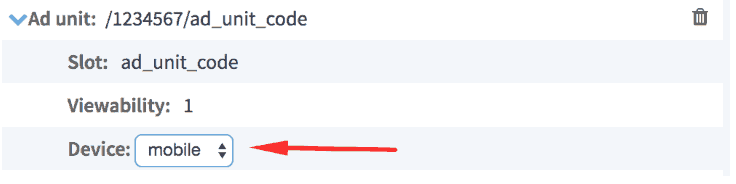
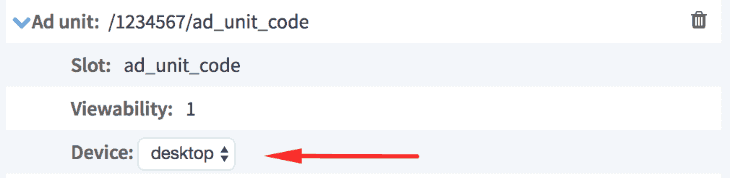
Step 5: Open the site, right click > view page source
Step 6: Search the div ID’s. You should only see each body tag or div deployed once

Step 7: If you see any duplicates, remove them.
ON-page:
Step 1: Open the page, right click > view page source
Step 2: CTRL+F “defineslot” to locate DFP header tags
Step 3: If the publisher is using a separate set of ads on mobile vs desktop, check that device detection codes are set to properly load the ads based on device:
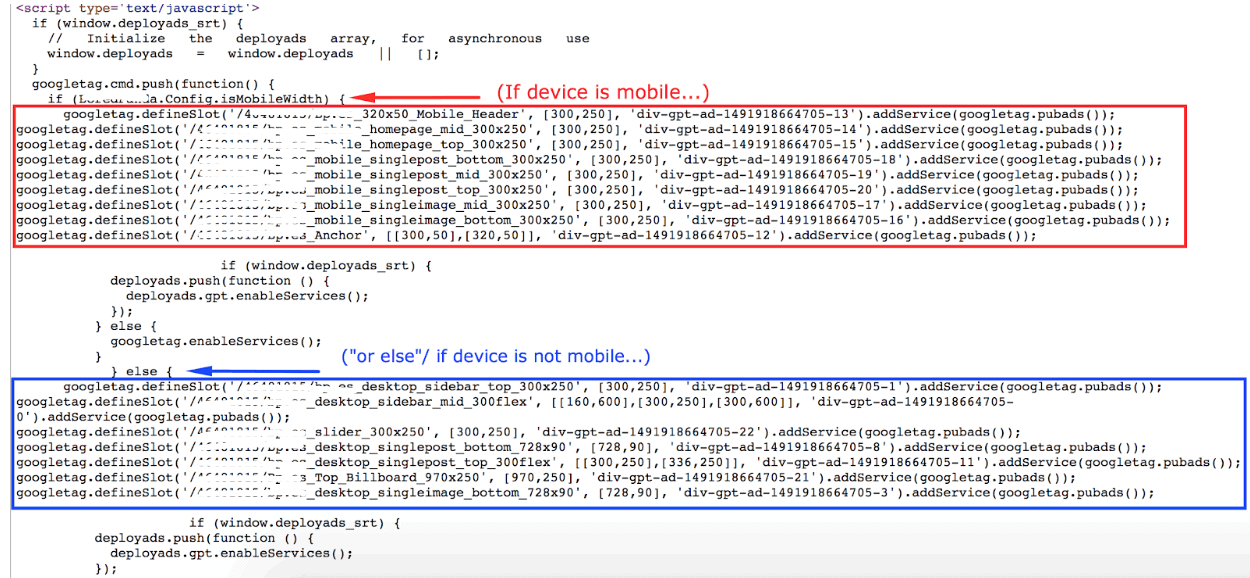
Step 4: Search the div ID’s. You should only see each body tag or div deployed once

Step 5: Using a mobile emulator, refresh the page to load mobile
Step 6: View page source again and hunt down the duplicate ID
Step 7: If you see any duplicates, remove them.
Need more help? Sign up for a Premium account today and leverage your long-term RPMs!
If you have an account with us already, send us an email at support@monetizemore.com or log in to PubGuru App and use the Chat widget for immediate support.
Let our AdOps Experts do the hard work. Sign up today and unlock your revenue potential.