





Sign up today and see the results for yourself!
Want to speed up your verification process?
Share a screenshot of your ad revenue from the past 3 months.
Use your best judgment when dealing with this notification as not all “bad words” are actually “bad” especially when a site contains words from languages other than English.
Step 1: If the notification is verified correct, advise the publisher to take down the content or delete the bad word/s.
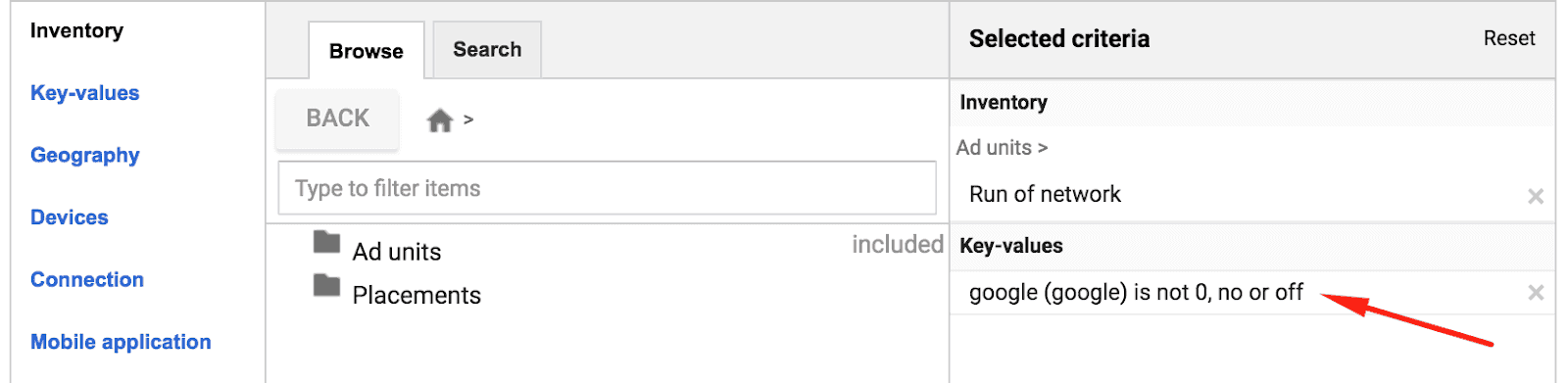
Step 2: In case the publisher refuses to do as advised, have him deploy a Key Value Pair on pages where bad words exist.
Key: google
Value: 0, no or off (choose one)
-Deploy this right above the Header Bidding header script:
window.m2hb = window.m2hb || {};
window.m2hb.kvps = {’key’ : ’value’};
-Deploy in the header, sample below:
googletag.pubads().enableSingleRequest();
googletag.pubads().setTargeting(‘key’, [‘value’]);
googletag.enableServices();
Sample:

Step 3: Remember that the key & value are case sensitive. It needs to match exactly what’s on DFP.
This will automatically shut off Google demand (Ad Exchange and AdSense) on pages where this KVP is deployed. All publisher DFP accounts we have access to will have this Key Value Pair set by default across all Ad Exchange and AdSense line items:
Need more help? Sign up for a Premium account today and leverage your long-term RPMs!
If you have an account with us already, send us an email at support@monetizemore.com or log in to PubGuru App and use the Chat widget for immediate support.
Let our AdOps Experts do the hard work. Sign up today and unlock your revenue potential.